
KrispCall
With the powerful combination of KrispCall + Salesloft CRM, you can enhance flexibility and efficiency with data-driven insights for marketing campaigns and sales teams.
Description
KrispCall is a modern cloud telephony platform that helps sales teams call, text, and manage conversations directly from Salesloft. With seamless calling and SMS inside your Salesloft workflows, reps can connect with prospects faster while keeping every interaction logged automatically.
KrispCall provides virtual phone numbers from over 100 countries, making it easy to build a local presence anywhere in the world. Sales teams can track call activity, recordings, and messages within Salesloft, ensuring complete visibility and better follow-ups without switching tools.
Designed for high-performing sales teams, the KrispCall and Salesloft integration helps increase connect rates, improve productivity, and deliver more personalized outreach at scale.
Key benefits
Here are the key benefits of integrating KrispCall with Salesloft CRM to enhance your sales efficiency and customer interactions.
1. Improve Lead Management and Sales Efficiency
Integrating KrispCall with Salesloft CRM makes handling leads and tracking calls simpler. This integration provides real-time access to customer data, helping sales teams connect with leads more effectively and streamline their workflow.
With important details at their fingertips, teams can respond quickly and close deals more efficiently. This added efficiency allows sales reps to focus on connecting with potential clients and driving results.
2. Reduce Time on Routine Tasks
KrispCall and Salesloft take care of repetitive tasks like call logging and lead tracking through automation. This not only reduces errors but also saves time, freeing up team members to focus on high-value tasks.
Automation keeps records accurate and operations running smoothly, resulting in a more efficient workflow. It’s a practical way to help teams spend their time where it matters most.
3. Access Advanced Calling Tools in One Place
With KrispCall’s calling features integrated into Salesloft, handling client calls has become more organized and efficient.
Features like call recording, live monitoring, IVR, and call routing make it easy to manage calls directly within Salesloft. This way, teams can respond quickly and provide a better customer experience.
4. Gain Marketing Insights with Data-Driven Analytics
KrispCall and Salesloft CRM integration bring insights that help guide marketing strategies. By analyzing customer behaviors and engagement, marketers can improve lead scoring and fine-tune campaigns for better results.
This data-driven approach allows teams to adjust strategies based on what customers want, leading to higher conversion rates and more effective campaigns.
5. Align Sales and Marketing for Streamlined Operations
KrispCall and Salesloft CRM together create a single platform for managing sales and marketing activities. Teams can track leads, monitor sales performance, and analyze campaigns, simplifying tasks and promoting collaboration.
This unified setup keeps both sales and marketing efforts aligned, ensuring smoother operations and helping businesses achieve shared goals.
How It Works
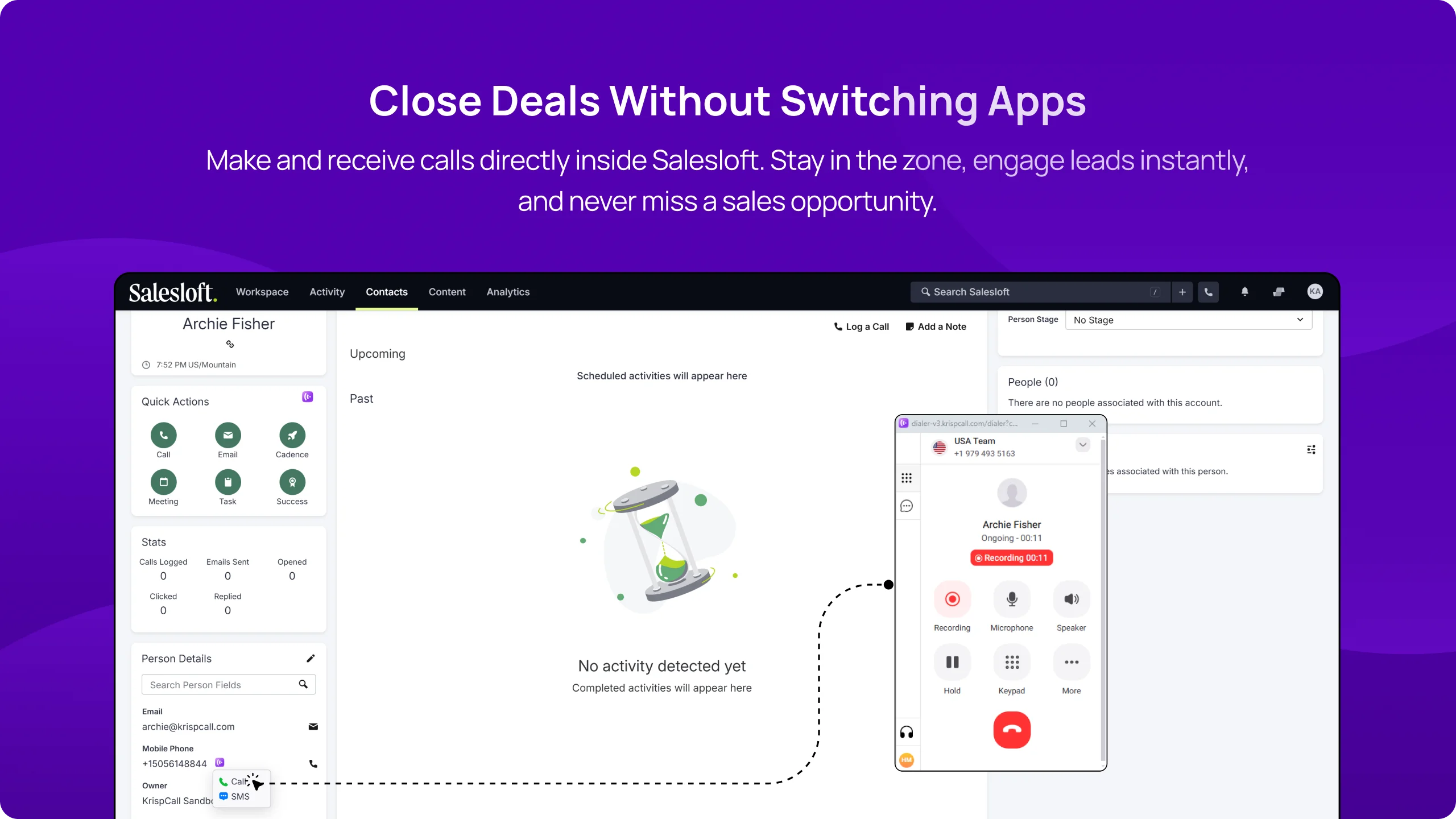
Install the KrispCall Browser Extension to enable Click to Call functionality from within Salesloft.
This extension integrates directly with Salesloft, allowing users to make calls without leaving the platform, improving workflow efficiency and communication.
Salesloft users can make and receive calls without leaving their workflow. With KrispCall’s cloud telephony integration, sales reps can engage prospects instantly, improving response times and efficiency. Whether following up on warm leads or handling customer inquiries, seamless in-app calling ensures sales teams stay focused, productive, and always connected to high-value opportunities.
Salesloft users can make and receive calls without leaving their workflow. With KrispCall’s cloud telephony integration, sales reps can engage prospects instantly, improving response times and efficiency. Whether following up on warm leads or handling customer inquiries, seamless in-app calling ensures sales teams stay focused, productive, and always connected to high-value opportunities.
Features
Make & Receive Calls Directly in Salesloft
Eliminate the hassle of switching platforms—Salesloft users can make and receive calls without leaving their workflow. With KrispCall’s cloud telephony integration, sales reps can engage prospects instantly, improving response times and efficiency. Whether following up on warm leads or handling customer inquiries, seamless in-app calling ensures sales teams stay focused, productive, and always connected to high-value opportunities.
Built-in SMS Functionality for Faster Customer Engagement
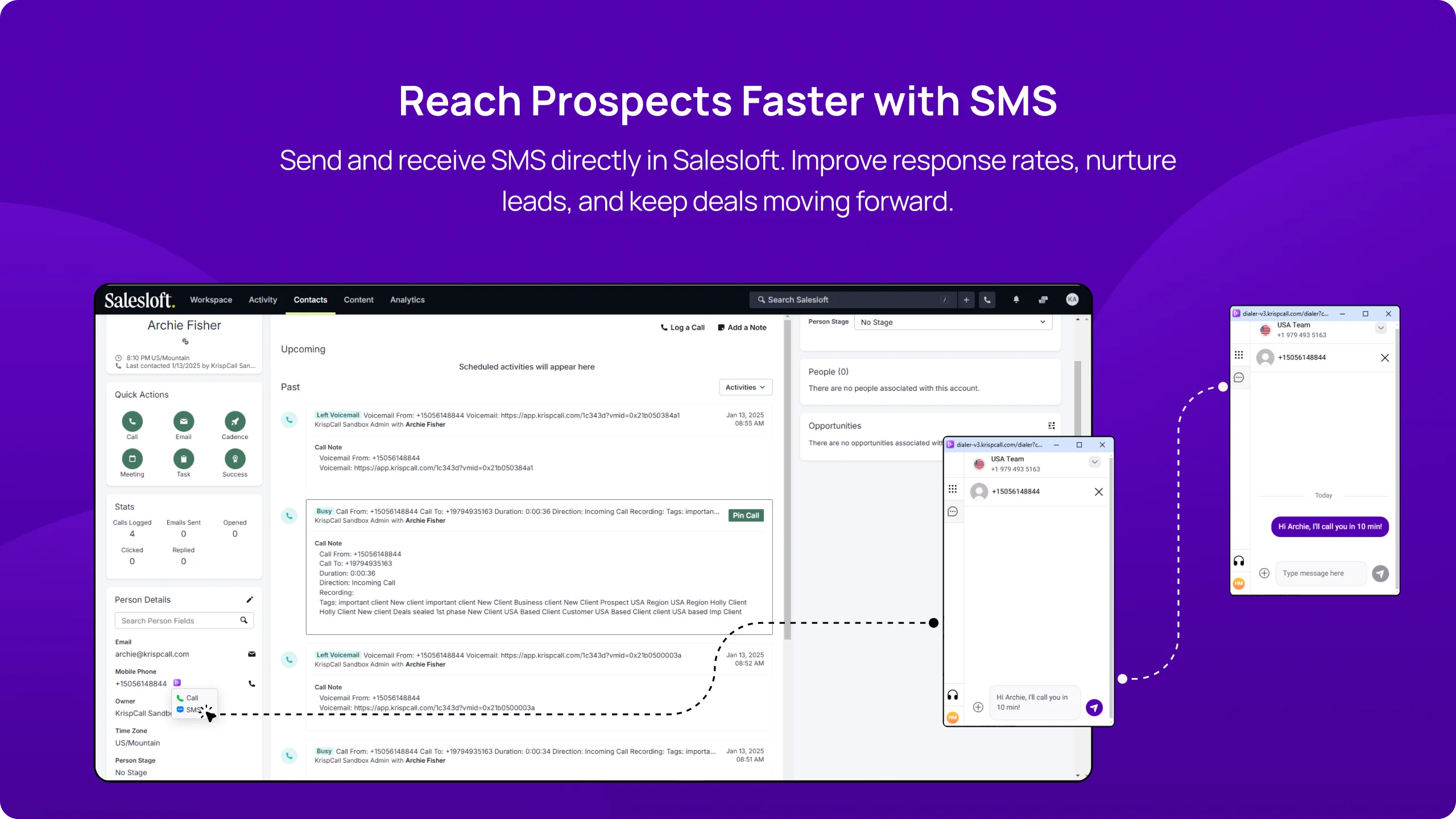
Engage prospects instantly with KrispCall’s SMS integration inside Salesloft. Whether sending follow-ups, appointment reminders, or personalized offers, sales reps can communicate efficiently without switching apps. SMS ensures faster response times, enhances lead nurturing, and keeps potential customers engaged throughout the sales journey. Plus, automated SMS workflows help streamline outreach, saving time while maximizing conversions.
Two-Way Contact Sync for Effortless Lead Management
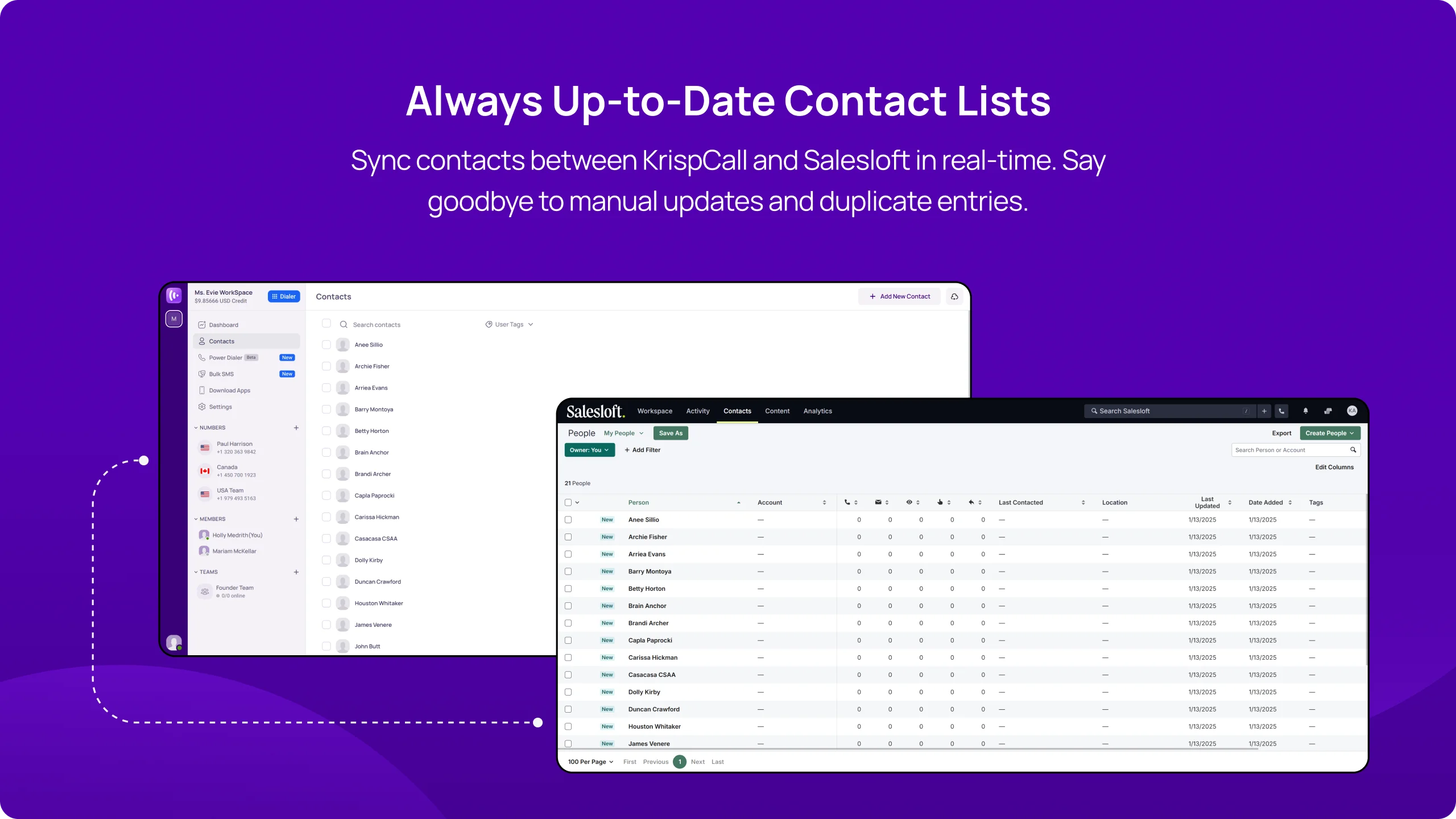
Keep your contact lists updated automatically with KrispCall’s two-way contact sync. No more manual entries—any updates in Salesloft or KrispCall reflect in real-time, ensuring reps always have the latest prospect information. This feature streamlines lead tracking, prevents duplicate contacts, and ensures accurate data across platforms, allowing sales teams to nurture relationships without missing critical details.
Instant Call & SMS Logs for Smarter Follow-Ups
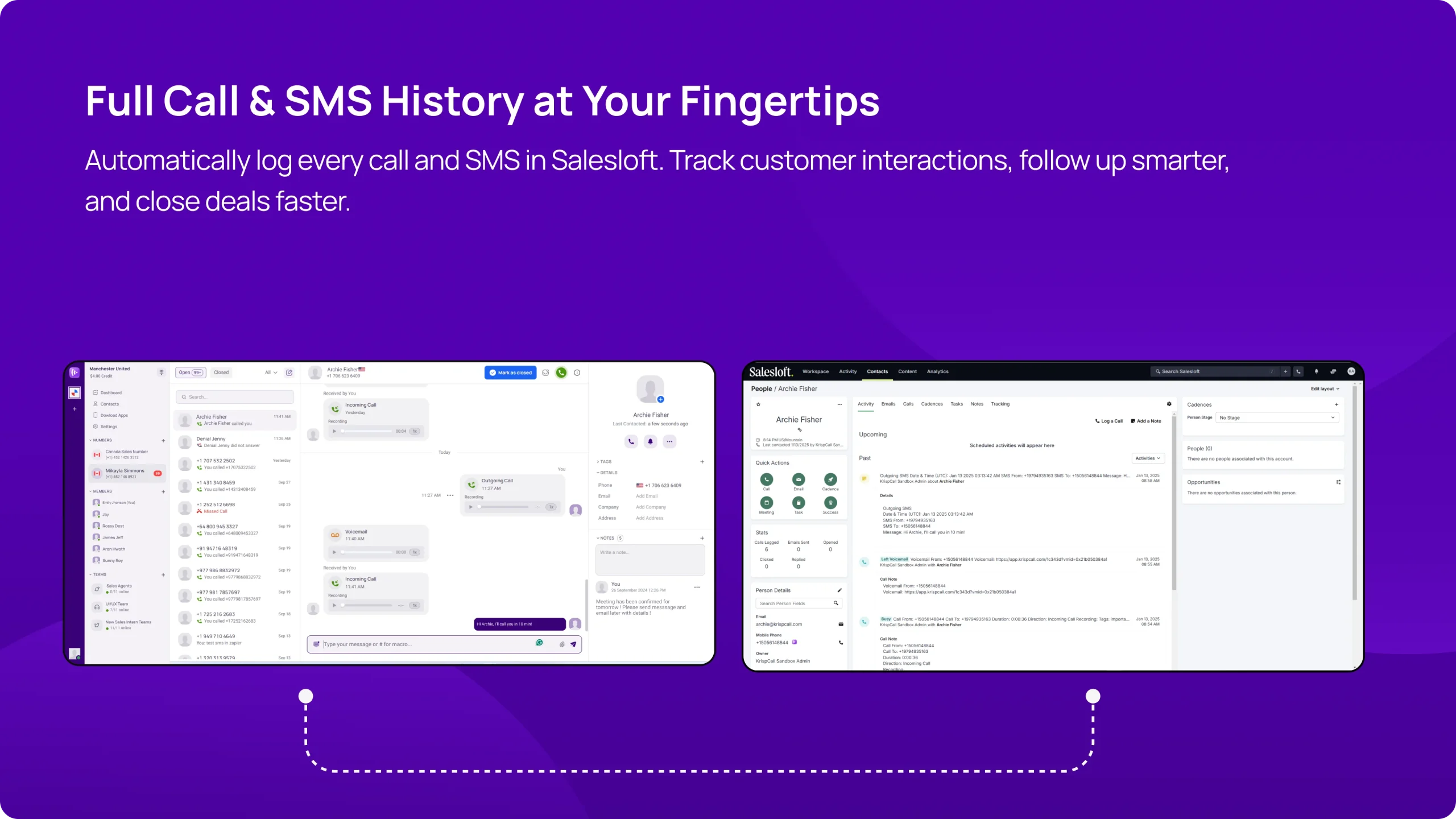
Never lose track of conversations with automated calls and SMS logging inside Salesloft. Every interaction is recorded, providing sales teams with full visibility into customer touchpoints. Whether reviewing past discussions, tracking follow-ups, or analyzing engagement history, having all logs in one place helps reps personalize outreach, refine sales strategies, and close deals faster.
Live Customer History for Complete Interaction Context
Gain a comprehensive view of every client interaction in one unified place. Whether it’s a call, SMS message, or a past note, your sales reps have immediate access to detailed records and context-rich data, including tags and custom notes. This seamless integration ensures reps have all the information they need in real-time, enabling personalized follow-ups and efficient resolution of client queries. Keep track of every engagement and build a more connected, informed relationship with every client.
Media
Setup
- Sign in to KrispCall: Access your KrispCall account and navigate to Settings to begin the integration.
- Open the Integration Menu and Select Salesloft: In the Settings menu, click on Integrations under App Settings to continue and find Salesloft in the list for integration.
- Sign in to your Salesloft account: After this, a new window will appear, indicating you to sign in to your Salesloft account for integration.
- Enable Salesloft Integration Features: Click the Toggle button below Salesloft in KrispCall to activate and use the integration features.
FAQ
If you experience any issues while integrating KrispCall with Salesloft, consult the support documentation or contact customer support for assistance.
By centralizing communication tools and automating data entry, the integration helps streamline workflows, allowing sales teams to focus on closing deals.